Difference between revisions of "Supply Point Details"
Jump to navigation
Jump to search


Paul Chapman (talk | contribs) |
|||
| (16 intermediate revisions by 3 users not shown) | |||
| Line 1: | Line 1: | ||
| − | A | + | A Supply Point is the physical point at which consumption of a commodity is metered for billing purposes (e.g. ICP for electricity or gas). |
| − | An account may be associated with a number of | + | An account may be associated with a number of supply points over time and vice versa. The supply points (ICPs) page allows supply points details to be used, as an alternative to account Id, for accessing cost and consumption data. |
| − | Data filtered by a | + | Data filtered by a supply point may contain history stretching back over several accounts, possibly with more than one supplier. Charts and tables for supply points are more likely to span longer historical periods than would be the case if only the account was selected. |
---- | ---- | ||
| Line 17: | Line 17: | ||
! '''Purpose''' | ! '''Purpose''' | ||
| | | | ||
| − | :To compare how normalised monthly consumption tracks against cost over a period for one or more sites. Nearly all graph features can be configured in-session, allowing the page to be used for | + | :To compare how normalised monthly consumption tracks against cost over a period for one or more sites. Nearly all graph features can be configured in-session, allowing the page to be used for supply points of any commodity. |
|} | |} | ||
| Line 75: | Line 75: | ||
|} | |} | ||
| − | |||
---- | ---- | ||
| Line 81: | Line 80: | ||
[[File:Conn2.png|right|750px|Frame|Electricty Actual vs Forecast Cost]] | [[File:Conn2.png|right|750px|Frame|Electricty Actual vs Forecast Cost]] | ||
| − | ====Monthly | + | ====Monthly Budgeted vs Projected Usgae - Energy (default)==== |
{| class="wikitable" style="text-align: left; color: black;" | {| class="wikitable" style="text-align: left; color: black;" | ||
! width="100pt"|'''Object type''' | ! width="100pt"|'''Object type''' | ||
| | | | ||
| − | :[[Graph# | + | :[[Graph#Unit_Graphs|Unit chart]] |
|- | |- | ||
!'''Purpose''' | !'''Purpose''' | ||
| | | | ||
| − | :To highlight variance between | + | :To highlight variance between budgeted and projected consumption profiles for one or more sites. |
|} | |} | ||
| Line 136: | Line 135: | ||
|- | |- | ||
| | | | ||
| − | : | + | :Units |
| − | |||
| − | |||
| − | |||
|- | |- | ||
| | | | ||
| − | : | + | :Monthly Value Types |
|- | |- | ||
| | | | ||
| − | : | + | :Plot Type |
|} | |} | ||
| − | |||
| − | |||
---- | ---- | ||
| − | [[File: | + | [[File:ICP Details.PNG|right|750px|Frame|Supply Points Table (Left)]] |
| + | [[File:ICP Details2.png|right|400px|Frame|Supply Points Details Panel)]] | ||
| − | ==== | + | ====Supply Point Browser==== |
{| class="wikitable" style="text-align: left; color: black; Width=400pt" | {| class="wikitable" style="text-align: left; color: black; Width=400pt" | ||
! Width="200pt"|'''Object type''' | ! Width="200pt"|'''Object type''' | ||
| | | | ||
| − | : | + | :Supply Point List |
|- | |- | ||
! '''Purpose''' | ! '''Purpose''' | ||
| | | | ||
| − | :To provide fast access to details for all Accounts with associated with a | + | :To provide fast access to details for all Accounts with associated with a supply point (ICP). |
|} | |} | ||
| Line 203: | Line 198: | ||
{| class="wikitable" style="text-align: left; color: black; Width=600pt;" | {| class="wikitable" style="text-align: left; color: black; Width=600pt;" | ||
! Width="200pt"|'''Feature''' | ! Width="200pt"|'''Feature''' | ||
| − | ! Width="400pt"'''Description''' | + | ! Width="400pt"|'''Description''' |
|- | |- | ||
| | | | ||
:'''Number of Entries Selector''' | :'''Number of Entries Selector''' | ||
| | | | ||
| − | :Selects how many | + | :Selects how many supply points entries will appear in the object (a vertical scroll bar will appear when more entries than can fit in the control are selected). |
|- | |- | ||
| | | | ||
:'''Off-Screen Entry Selector''' | :'''Off-Screen Entry Selector''' | ||
| | | | ||
| − | :A set of numbered buttons, reach representing a sub-page containing the selected number of currently off-screen | + | :A set of numbered buttons, reach representing a sub-page containing the selected number of currently off-screen supply point entries. |
|- | |- | ||
| | | | ||
:'''Connection Search''' | :'''Connection Search''' | ||
| | | | ||
| − | :Allows the current set of | + | :Allows the current set of supply point entries to be filtered by a search string. Search takes place across all fields in the supply point line and is applied with each character is typed. |
|- | |- | ||
| | | | ||
:'''Count of Entries''' | :'''Count of Entries''' | ||
| | | | ||
| − | :Shows a count of the individual | + | :Shows a count of the individual supply points currently accessible (this count is updated as searches are applied. |
|- | |- | ||
| | | | ||
:'''Sortable Columns''' | :'''Sortable Columns''' | ||
| | | | ||
| − | :All columns with a pale grey double headed arrow on the right margin of the column header cell are sortable. A single click anywhere in the column cell sorts the whole | + | :All columns with a pale grey double headed arrow on the right margin of the column header cell are sortable. A single click anywhere in the column cell sorts the whole supply point list in ascending order by the contents of the column. A second click re-sorts in descending order. The list can only be sorted by one column at a time. Currently applied sorts are indicated by replacing the grey double headed arrows with a single dark grey arrow head (down for descending order, up for ascending order). |
|- | |- | ||
| | | | ||
:'''Connection Selection''' | :'''Connection Selection''' | ||
| | | | ||
| − | :Clicking anywhere in a row in the | + | :Clicking anywhere in a row in the supply point list (which will be highlighted as the mouse moves over it) will cause the individual supply point to be applied in the filter. This causes all pages in the data section to display only data related to that supply point. |
|} | |} | ||
| − | |||
---- | ---- | ||
| − | [[File: | + | [[File:Notes.PNG|right|750px|Frame|Connections Table (Left)]] |
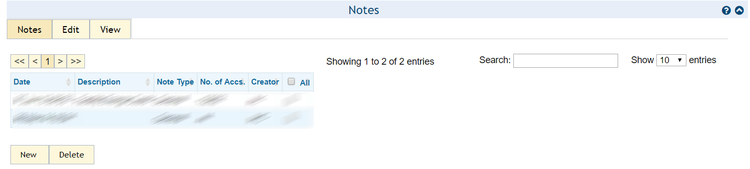
====Notes Browser==== | ====Notes Browser==== | ||
| Line 246: | Line 240: | ||
!'''Object type''' | !'''Object type''' | ||
| | | | ||
| − | :[[Notes | + | :[[Notes|Notes browser]] |
|- | |- | ||
! Width="100pt"|'''Purpose''' | ! Width="100pt"|'''Purpose''' | ||
| | | | ||
| − | :To allow viewing and editing of notes (e.g. meter notes) associated with the | + | :To allow viewing and editing of notes (e.g. meter notes) associated with the supply point. |
|} | |} | ||
| Line 266: | Line 260: | ||
:None | :None | ||
|} | |} | ||
| − | |||
| − | |||
Latest revision as of 15:54, 19 September 2017
A Supply Point is the physical point at which consumption of a commodity is metered for billing purposes (e.g. ICP for electricity or gas).
An account may be associated with a number of supply points over time and vice versa. The supply points (ICPs) page allows supply points details to be used, as an alternative to account Id, for accessing cost and consumption data.
Data filtered by a supply point may contain history stretching back over several accounts, possibly with more than one supplier. Charts and tables for supply points are more likely to span longer historical periods than would be the case if only the account was selected.

Monthly Consumption vs Cost - Energy (default)
| Object type | |
|---|---|
| Purpose |
|
| Defaults | |
|---|---|
|
|
|
|
|
|
|
|
|
|
| Configurable in session |
|---|
|
|
|
|
|
|
|

Monthly Budgeted vs Projected Usgae - Energy (default)
| Object type | |
|---|---|
| Purpose |
|
| Defaults | |
|---|---|
|
|
|
|
|
|
|
|
|
|
| Configurable in session |
|---|
|
|
|
|
|
|


Supply Point Browser
| Object type |
|
|---|---|
| Purpose |
|
| Defaults | |
|---|---|
|
|
|
|
|
|
|
|
| Configurable in session |
|---|
|
|
| Feature | Description |
|---|---|
|
|
|
|
|
|
|
|
|
|
|
|

Notes Browser
| Object type | |
|---|---|
| Purpose |
|
| Defaults |
|---|
|
| Configurable in session |
|---|
|