Difference between revisions of "Time Of Use Graph"
Jump to navigation
Jump to search
| Line 90: | Line 90: | ||
| | | | ||
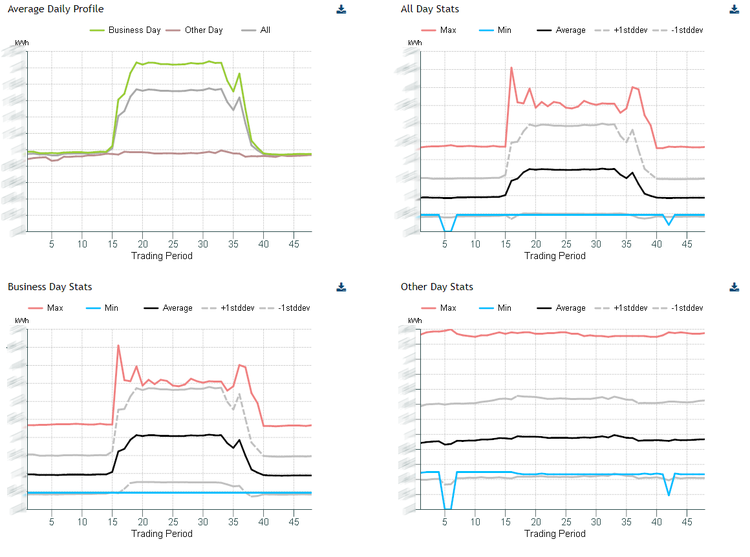
:Charts the average usage over a day | :Charts the average usage over a day | ||
| − | + | |- | |
| − | + | !Width="100" Align="Center"|'''Average daily profile ''' | |
| − | : | + | | |
| − | + | :Split by All Day, Business Day and Other Day | |
| + | |- | ||
| + | !Width="100" Align="Center"|'''All Day Stats ''' | ||
| + | | | ||
| + | :All the usage split by Max, Min, Average, +1 standard deviation, -1 standard deviation | ||
| + | |- | ||
| + | !Width="100" Align="Center"|'''Business Day Stats''' | ||
| + | | | ||
| + | :Business day usage split by Max, Min, Average, +1 standard deviation, -1 standard deviation | ||
| + | |- | ||
| + | !Width="100" Align="Center"|'''Other Day Stats''' | ||
| + | | | ||
| + | :Other day usage split by Max, Min, Average, +1 standard deviation, -1 standard deviation | ||
|} | |} | ||
Revision as of 09:52, 20 September 2017
Confirguration

| Settings | Description | Values |
|---|---|---|
|
|
|
|
|
|
|
|
|
|
|
|
|
|
|
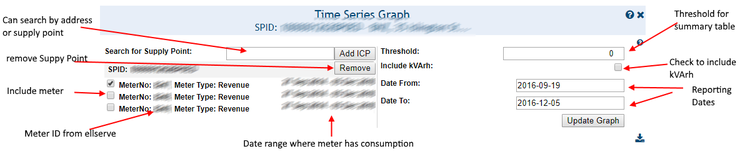
Note: The configuration is for the whole page
HHD Graph

| Purpose |
|
|---|---|
| Example |
|
Summary Table

| Purpose |
|
|---|
Average profiles

| Purpose |
|
|---|---|
| Average daily profile |
|
| All Day Stats |
|
| Business Day Stats |
|
| Other Day Stats |
|