Difference between revisions of "Time Of Use Graph"

From Ellserve Wiki
Jump to navigation Jump to search
Line 6: Line 6:
 
|-
 
|-
 
|
 
|
:'''Title'''
+
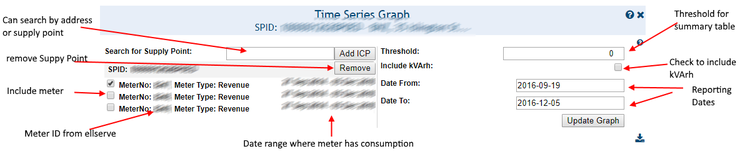
:'''Search for Supply Point'''
 
|
 
|
:[[Control Title Configuration|Graph display title]]
+
:Allows a user to search for supply points based on SupplyPoint or address and add it to the list
 
|
 
|
:Custom
+
:Supply Points
 
|-
 
|-
 
|
 
|

Revision as of 09:33, 20 September 2017

Data Table Configuration Panel
Settings Description Values
Search for Supply Point
Allows a user to search for supply points based on SupplyPoint or address and add it to the list
Supply Points
Graph type
Determines the type of chart displayed
Single Y-Axis
Graph value type
Determines if point values are charted singly or cumulatively
  • Monthly
  • Cumulative
Wrap type
Determines if values are charted continuously or wrapped buy financial year
  • Continuous
  • Year wrap
Height
Determines the vertical height (in pixels) of the chart on the rendered web page
Custom
Y-Axis value type
Value to be charted
All time series data values
Y-Axis plot type
Determines the on-screen appearance of the data plot
  • Line
  • Bar
Date range
Reporting time period
Date range from date picker
Data Table Display
Data Table Display
Data Table Display