Difference between revisions of "Invoice Browser"
Jump to navigation
Jump to search
(→Usage) |
(→Usage) |
||
| Line 44: | Line 44: | ||
---- | ---- | ||
| − | [[Main Page | | + | [[Main Page | ►Main Page]] |
| − | [[Guide to Ellserve | | + | [[Guide to Ellserve | ►Guide to Ellserve]] |
| − | [[Data Browser| | + | [[Data Browser| ►Data Browser]] |
| − | [[Data Page| | + | [[Data Page| ►Data Page]] |
| − | [[Display Controls| | + | [[Display Controls| ►Display Controls]] |
Revision as of 16:02, 27 June 2014

| Purpose |
|
|---|
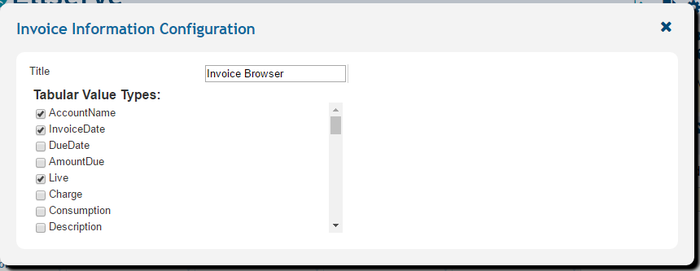
Configuration
The invoice browser configuration panel

| Settings | Description | Values |
|---|---|---|
|
| |
|
|
|
|
|
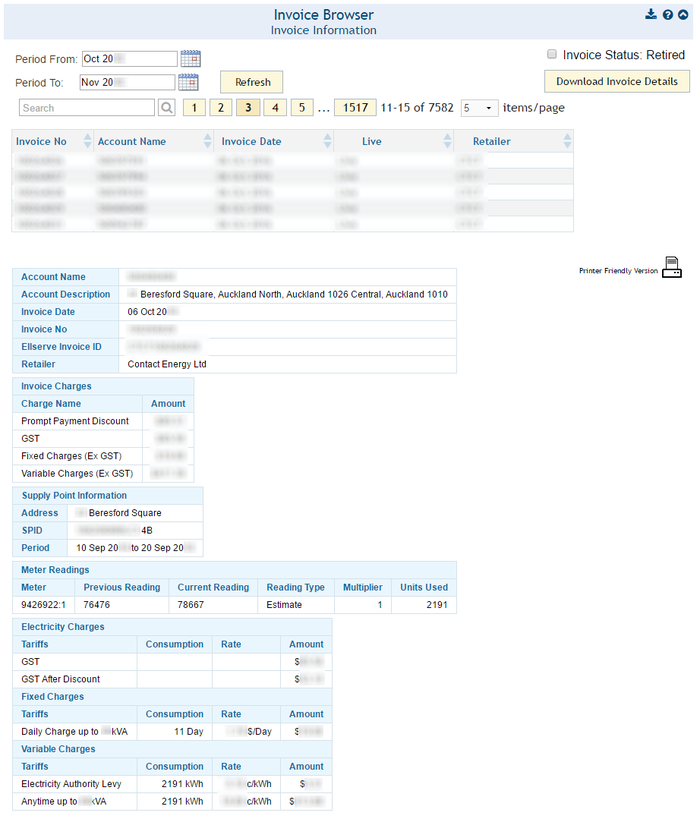
Usage
The invoice browser has a number of interactive features to identify and display invoices. The invoice list allows access to a single invoice which is displayed in the invoice details panel.
►Main Page ►Guide to Ellserve ►Data Browser ►Data Page ►Display Controls