Difference between revisions of "Invoice Browser"
Jump to navigation
Jump to search
(→Usage) |
|||
| Line 7: | Line 7: | ||
==Configuration== | ==Configuration== | ||
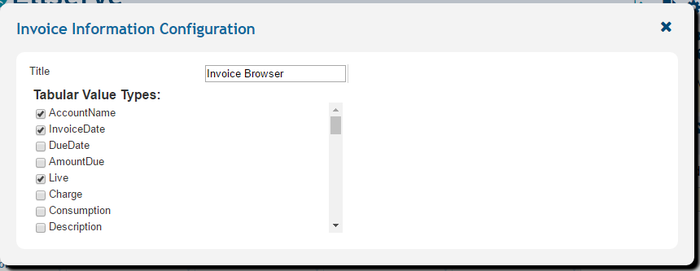
===The invoice browser configuration panel=== | ===The invoice browser configuration panel=== | ||
| − | [[File: | + | [[File:InvoiceBrowser_All.PNG.png|right|700px|Frame|Data Table Display]] |
{|class="wikitable" style="text-align: left; color: black;" | {|class="wikitable" style="text-align: left; color: black;" | ||
! Width="150" Align="Center"|'''Settings''' | ! Width="150" Align="Center"|'''Settings''' | ||
Revision as of 13:30, 19 September 2017

| Purpose |
|
|---|
Configuration
The invoice browser configuration panel

| Settings | Description | Values |
|---|---|---|
|
| |
|
|
|
|
|
Usage
The invoice browser has a number of interactive features to identify and display invoices. The invoice list allows access to a single invoice which is displayed in the invoice details panel.
►Main Page ►Guide to Ellserve ►Data Browser ►Data Page ►Display Controls