Difference between revisions of "Budget Tracking"
Jump to navigation
Jump to search

Paul Chapman (talk | contribs) (Created page with "== The Budget Tracker Control == 700px|right 700px|right {| class="wikitable" style="text-align: left; color: bl...") |
(→Usage) |
||
| (14 intermediate revisions by 2 users not shown) | |||
| Line 1: | Line 1: | ||
| − | == | + | The budget tracker allows actual cost and consumption to be tracked against budgets by individual account or by any grouping of accounts. The tracker highlights variances over a user-defined threshold by by month or quarter. |
| + | |||
| + | ==Configuration== | ||
[[File:Budget Tracker Config.PNG|700px|right]] | [[File:Budget Tracker Config.PNG|700px|right]] | ||
[[File:Budget Tracker.PNG|700px|right]] | [[File:Budget Tracker.PNG|700px|right]] | ||
| Line 5: | Line 7: | ||
!Width="100" Align="Center"|'''Purpose ''' | !Width="100" Align="Center"|'''Purpose ''' | ||
| | | | ||
| − | :To | + | :To allow comparison between budgeted and actual cost and consumption. |
|} | |} | ||
| Line 23: | Line 25: | ||
:'''Category''' | :'''Category''' | ||
| | | | ||
| − | :Determines | + | :Determines how quantitative data is aggregated |
| | | | ||
:Retailer, Business Unit, Asset Type, etc. | :Retailer, Business Unit, Asset Type, etc. | ||
| Line 30: | Line 32: | ||
:'''Commodity''' | :'''Commodity''' | ||
| | | | ||
| − | :Determines the commodity for which data will be displayed | + | :Determines the commodity for which data will be displayed |
| | | | ||
:*Energy | :*Energy | ||
| Line 71: | Line 73: | ||
:'''Track By''' | :'''Track By''' | ||
| | | | ||
| − | :Controls the length of the | + | :Controls the length of the reporting period used |
| | | | ||
:*Monthly | :*Monthly | ||
| Line 77: | Line 79: | ||
|} | |} | ||
| − | [[ | + | ==Usage== |
| + | The budget tracking control has no interactive usage features. | ||
| + | |||
| + | |||
| + | ---- | ||
| + | [[Main Page | ►Main Page]] | ||
| + | [[Guide to Ellserve | ►Guide to Ellserve]] | ||
| + | [[Data Browser| ►Data Browser]] | ||
| + | [[Data Page| ►Data Page]] | ||
| + | [[Display Controls| ►Display Controls]] | ||
Latest revision as of 15:03, 27 June 2014
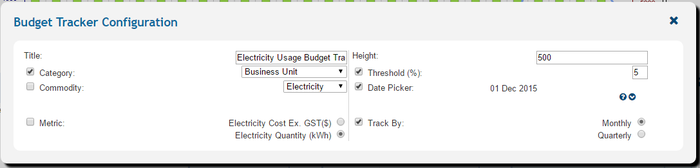
The budget tracker allows actual cost and consumption to be tracked against budgets by individual account or by any grouping of accounts. The tracker highlights variances over a user-defined threshold by by month or quarter.
Configuration


| Purpose |
|
|---|
| Settings | Description | Values |
|---|---|---|
|
| |
|
|
|
|
|
|
|
|
|
|
|
|
|
|
|
|
|
|
|
|
|
Usage
The budget tracking control has no interactive usage features.
►Main Page ►Guide to Ellserve ►Data Browser ►Data Page ►Display Controls