Difference between revisions of "Notes"
Jump to navigation
Jump to search

Paul Chapman (talk | contribs) |
(→Usage) |
||
| (39 intermediate revisions by 2 users not shown) | |||
| Line 19: | Line 19: | ||
|- | |- | ||
| | | | ||
| − | :''' | + | :'''Supply Point (ICP)''' |
| | | | ||
| − | :To record information relating to a specific site/ | + | :To record information relating to a specific site/supply point. |
| | | | ||
:* To make note of a change in site usage that altered consumption patterns | :* To make note of a change in site usage that altered consumption patterns | ||
| Line 48: | Line 48: | ||
'''Note: The four different types assist in classifying the content of notes, however all notes are associated at the account level. | '''Note: The four different types assist in classifying the content of notes, however all notes are associated at the account level. | ||
When a note is created it is linked to all accounts current selected by the [[Filtering Functions|filter]].''' | When a note is created it is linked to all accounts current selected by the [[Filtering Functions|filter]].''' | ||
| − | |||
| − | |||
==Configuration== | ==Configuration== | ||
| Line 106: | Line 104: | ||
|} | |} | ||
| − | |||
| − | |||
| − | |||
---- | ---- | ||
===The editing panel=== | ===The editing panel=== | ||
| − | The | + | The editing panel allows notes created, edited and be associated with documents stored on Ellserve. |
| − | |||
| − | |||
| − | + | ===The viewing panel=== | |
| − | |||
| − | |||
| − | |||
| − | + | The viewing panel: | |
| + | * displays the text of a note | ||
| + | * provides links to associated documents | ||
| + | * provides a searchable list of all account associated with an individual note (unlike the note browsing panel which shows all notes for the selected accounts) | ||
| + | <gallery caption="The Editing and Viewing Panels" widths="450px" heights="300px" perrow="2"> | ||
| + | File:Edit.PNG | ||
| + | File:View1.PNG | ||
| + | </gallery> | ||
| − | + | ==[[Notes Usage|Usage]]== | |
| − | + | [[Notes Usage|Click here]] for more on using notes. | |
| − | |||
| − | [[ | + | ---- |
| − | + | [[Main Page | ►Main Page]] | |
| − | [[ | + | [[Guide to Ellserve | ►Guide to Ellserve]] |
| + | [[Data Browser| ►Data Browser]] | ||
| + | [[Data Page| ►Data Page]] | ||
| + | [[Display Controls| ►Display Controls]] | ||
Latest revision as of 16:04, 27 June 2014
Purpose
A note is a free text field for recording useful information at a variety of levels within Ellserve.
There are four types of note:
| Type | Description | Examples Of Use |
|---|---|---|
|
|
|
|
|
|
|
|
|
|
|
|
Note: The four different types assist in classifying the content of notes, however all notes are associated at the account level.
When a note is created it is linked to all accounts current selected by the filter.
Configuration
The notes control has no configurable features.
Features
The notes browser has three tabbed function panels:
- The browsing panel
- The editing panel
- The viewing panel
The browsing panel
The browsing provides access to previously created notes. It lists all notes for all accounts selected by the current filter.

| Feature | Description |
|---|---|
|
|
|
|
|
|
|
|
|
|
|
|
|
|
The editing panel
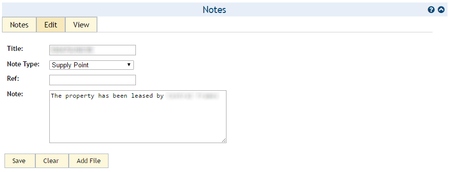
The editing panel allows notes created, edited and be associated with documents stored on Ellserve.
The viewing panel
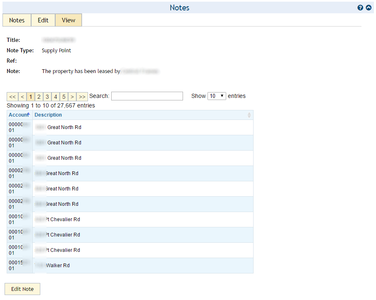
The viewing panel:
- displays the text of a note
- provides links to associated documents
- provides a searchable list of all account associated with an individual note (unlike the note browsing panel which shows all notes for the selected accounts)
- The Editing and Viewing Panels


Usage
Click here for more on using notes.
►Main Page ►Guide to Ellserve ►Data Browser ►Data Page ►Display Controls