Difference between revisions of "Account Information"

From Ellserve Wiki
Jump to navigation Jump to search
 
(9 intermediate revisions by 2 users not shown)
Line 50: Line 50:
 
|}
 
|}
  
[[Configuring Ellserve|Parent]] - [[Ellserve:Ellserve|Home]]
+
===Usage===
  
===Display Behaviour===
+
The account information control has a number of interactive features to identify and display [[Commodity Accounts#Account browser|account details]].
  
The Account information control displays data in to modes:
 
  
*Account list
+
----
*Account details
+
[[Main Page | ►Main Page]]
 
+
[[Guide to Ellserve | ►Guide to Ellserve]]
====Account List====
+
[[Data Browser| ►Data Browser]]
The account list shows all accounts matching the current [[Filtering Functions|filter]], with a column for each configured data value.  The list can be sorted by data value by clicking the column header (clicking twice reverses the sort order).
+
[[Data Page| ►Data Page]]
 
+
[[Display Controls| ►Display Controls]]
[[File:AccountDetails.png|500px|right]]
 
====Account Details====
 
Clicking in a row in the account list makes the selected the primary [[Filtering Functions|filter]], switching the display a mode in which only details for the selected account are shown.


Account details marked with a pencil icon can be edited.


[[Configuring Ellserve|Parent]] - [[Ellserve:Ellserve|Home]]
 

Latest revision as of 16:03, 27 June 2014

Purpose
To provide access to individual Account details and quickly identify accounts of interest (e.g. largest consumption, highest unit cost or lowest emissions.

Configuration

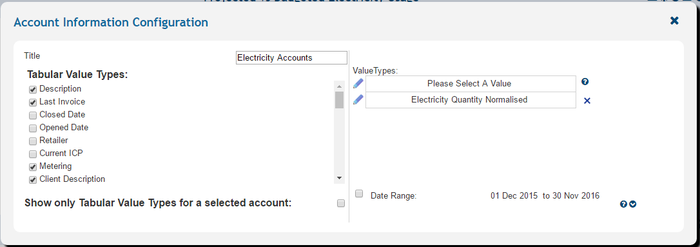
Account Config.PNG
Accounts.PNG
Settings Description Values
Title
Control display title
Custom
Tabular Value types
Controls which account details are shown in the table
  • Description
  • Last Invoice
  • Closed Date
  • Opened Date
  • Retailer
  • TAX
  • Consolidated Site
  • Department
Date range
Reporting time period
Date range from date picker
Value Types
Values to be reported in table
All time series data values

Usage

The account information control has a number of interactive features to identify and display account details.


►Main Page ►Guide to Ellserve ►Data Browser ►Data Page ►Display Controls