Difference between revisions of "Account Information"
Jump to navigation
Jump to search

Paul Chapman (talk | contribs) (Created page with "== The Account Control == 700px|right 700px|right {| class="wikitable" style="text-align: left; color: black;" !Width="100" A...") |
(→Usage) |
||
| (29 intermediate revisions by 2 users not shown) | |||
| Line 1: | Line 1: | ||
| − | + | __NOTOC__ | |
| − | |||
| − | |||
{| class="wikitable" style="text-align: left; color: black;" | {| class="wikitable" style="text-align: left; color: black;" | ||
!Width="100" Align="Center"|'''Purpose ''' | !Width="100" Align="Center"|'''Purpose ''' | ||
| | | | ||
| − | :To provide access to individual Account details | + | :To provide access to individual Account details and quickly identify accounts of interest (e.g. largest consumption, highest unit cost or lowest emissions. |
|} | |} | ||
| + | ===Configuration=== | ||
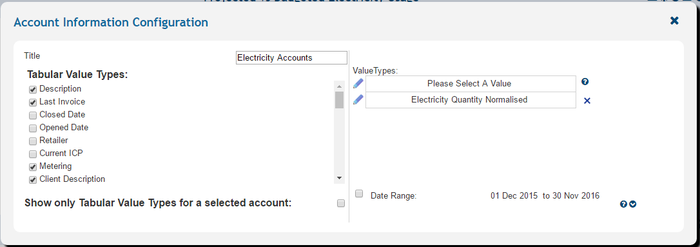
| + | [[File:Account Config.PNG|700px|right]] | ||
| + | [[File:Accounts.PNG|700px|right]] | ||
{|class="wikitable" style="text-align: left; color: black;" | {|class="wikitable" style="text-align: left; color: black;" | ||
| Line 23: | Line 24: | ||
:'''Tabular Value types''' | :'''Tabular Value types''' | ||
| | | | ||
| − | :Controls which details | + | :Controls which account details are shown in the table |
| | | | ||
:*Description | :*Description | ||
| Line 49: | Line 50: | ||
|} | |} | ||
| − | [[ | + | ===Usage=== |
| + | |||
| + | The account information control has a number of interactive features to identify and display [[Commodity Accounts#Account browser|account details]]. | ||
| + | |||
| + | |||
| + | ---- | ||
| + | [[Main Page | ►Main Page]] | ||
| + | [[Guide to Ellserve | ►Guide to Ellserve]] | ||
| + | [[Data Browser| ►Data Browser]] | ||
| + | [[Data Page| ►Data Page]] | ||
| + | [[Display Controls| ►Display Controls]] | ||
Latest revision as of 16:03, 27 June 2014
| Purpose |
|
|---|
Configuration


| Settings | Description | Values |
|---|---|---|
|
| |
|
|
|
|
|
|
|
Usage
The account information control has a number of interactive features to identify and display account details.
►Main Page ►Guide to Ellserve ►Data Browser ►Data Page ►Display Controls