Difference between revisions of "Delete Groups"
Jump to navigation
Jump to search
| Line 4: | Line 4: | ||
<span style="color:#2E5894">'''>> To delete an Ellserve Group''' select the required group from the drop down list, and then press the "Delete" button. | <span style="color:#2E5894">'''>> To delete an Ellserve Group''' select the required group from the drop down list, and then press the "Delete" button. | ||
| + | |||
| + | |||
| + | |||
| + | ---- | ||
| + | [[Main Page | <span style="font-family:webdings">4</span>Main Page]] | ||
| + | [[Settings | <span style="font-family:webdings">4</span>Settings]] | ||
| + | [[Account Groups | <span style="font-family:webdings">4</span>Account Groups]] | ||
Revision as of 16:39, 18 June 2014

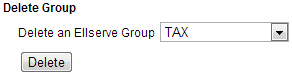
This allows you to delete Ellserve Groups.
>> To delete an Ellserve Group select the required group from the drop down list, and then press the "Delete" button.