ifference between revisions of "Generic Features Alternative"
Jump to navigation
Jump to search



Paul Chapman (talk | contribs) |
Paul Chapman (talk | contribs) |
||
| Line 22: | Line 22: | ||
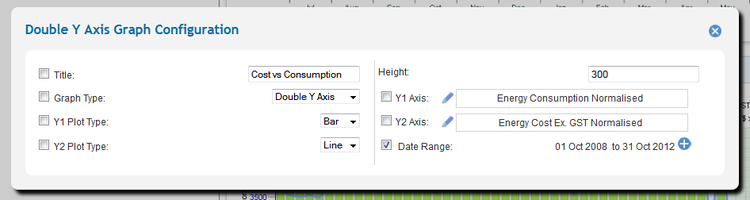
====Default Settings Panel==== | ====Default Settings Panel==== | ||
| − | [[File:DefaultPanel.png|right| | + | [[File:DefaultPanel.png|right|750px|Frame|Default Setting Panel - Chart Control]] |
====Control Title==== | ====Control Title==== | ||
Revision as of 14:15, 3 October 2012
The Configuration (Cog) Icon

Clicking on a cog icon opens a control’s default settings panel. This icon is only visible in configurable mode.
Note: The cog icon usually appears either in the top left corner of a control box or to the left of the text on a page tab.
In-session Settings Icon

The in-session parameters panel is managed using the expand/collapse icons to show/hide a control’s session settings.
Note: The expand/collapse icon usually appears either in the top right corner of a control box.
Default Settings Panel

Control Title

The in-session parameters panel is managed using the expand/collapse icons to show/hide a control’s session settings.
Note: The expand/collapse icon usually appears either in the top right corner of a control box.